> ## Documentation Index
> Fetch the complete documentation index at: https://www.worldmonitor.app/docs/llms.txt
> Use this file to discover all available pages before exploring further.
# Terminal Dashboard
> Run World Monitor in your terminal: live world map, news, markets, conflict, military flights, cyber, climate, prediction markets and live TV, with mouse support and colour themes. No API key needed.
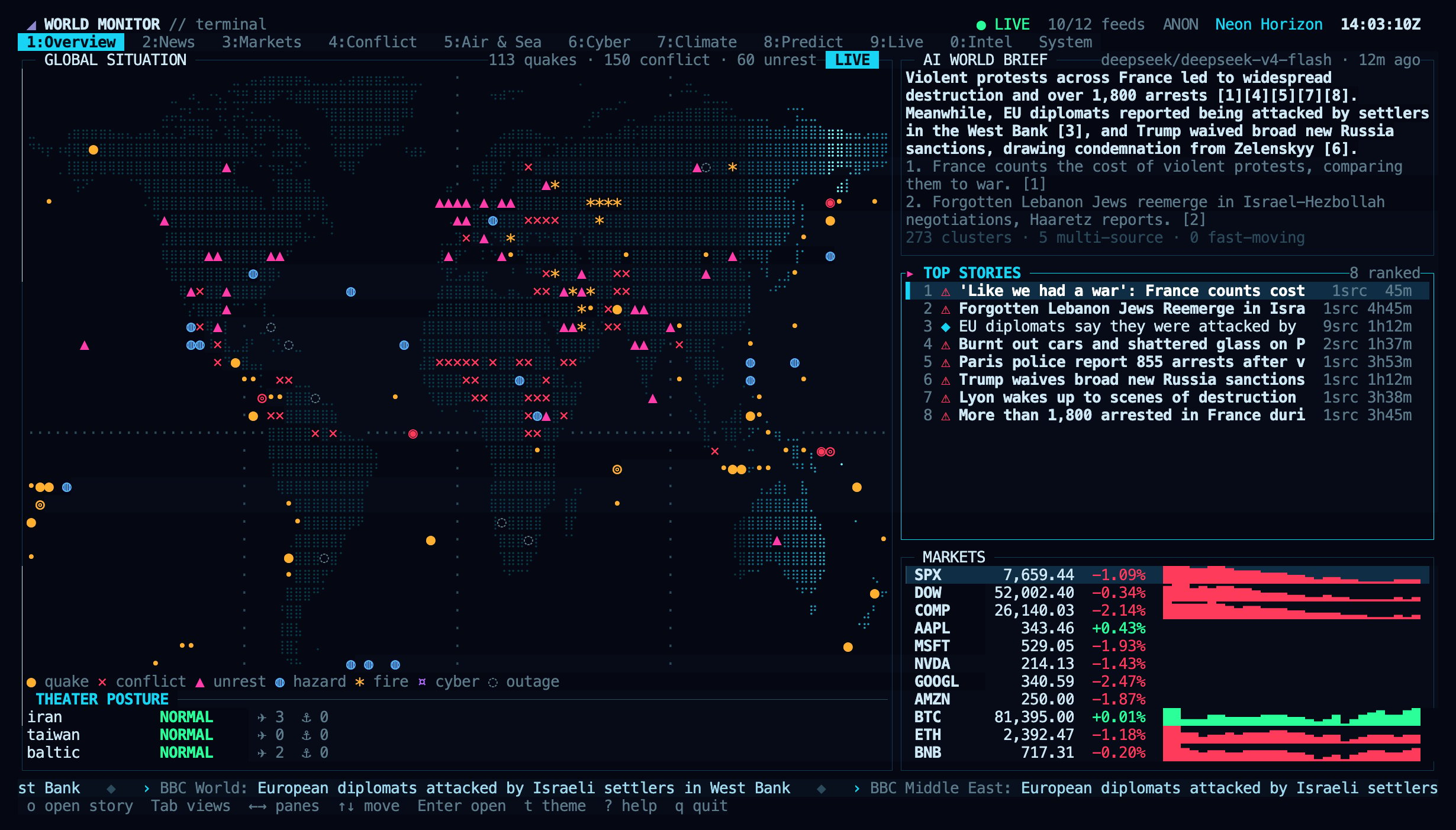
World Monitor also runs as a full-screen dashboard in your terminal. It ships in the [`worldmonitor`](https://www.npmjs.com/package/worldmonitor) npm package next to the [command-line client](/docs/cli), needs no API key, and shows the same live data as the [web dashboard](https://www.worldmonitor.app/dashboard): a world map, ranked news, markets, conflict and instability, military flights and shipping, cyber threats, climate hazards, prediction markets, live TV and webcams, and platform health.
 ## Start it
```sh theme={null}
npx worldmonitor # run once without installing
npm install -g worldmonitor # or install the `worldmonitor` command (alias `wm`)
worldmonitor # open the dashboard (same as `worldmonitor tui`)
```
Running `worldmonitor` with no arguments in an interactive terminal opens the dashboard. In a pipe, a script or CI it prints the help text instead, so existing automation is unaffected. Press `q` to quit; the terminal is restored as it was.
## Start it
```sh theme={null}
npx worldmonitor # run once without installing
npm install -g worldmonitor # or install the `worldmonitor` command (alias `wm`)
worldmonitor # open the dashboard (same as `worldmonitor tui`)
```
Running `worldmonitor` with no arguments in an interactive terminal opens the dashboard. In a pipe, a script or CI it prints the help text instead, so existing automation is unaffected. Press `q` to quit; the terminal is restored as it was.
 ### Requirements
* **Node.js 18 or newer.** The package has no dependencies.
* **An interactive terminal of at least 80×24.** Larger windows show more panes side by side; 160×45 or more gives the full layout shown on this page.
* **A terminal with truecolor and mouse support** for the best result, such as Ghostty, kitty, WezTerm, iTerm2, Konsole, Alacritty or the VS Code terminal. Terminals that do not report truecolor, including macOS Terminal, get 256 colours.
* **A font with braille and box-drawing characters** for the map and panel borders. Most current terminal fonts include them.
* **Optional:** [mpv](https://mpv.io) and [yt-dlp](https://github.com/yt-dlp/yt-dlp) to play live TV and webcams in the terminal. Without them, streams open in your browser.
## Views
Switch views with the number keys, `Tab` / `Shift+Tab`, or by clicking a tab.
| Key | View | What it shows |
| - | - | - |
| `1` | Overview | World map with live markers and a radar sweep, AI world brief, ranked top stories, market strip, theater posture |
| `2` | News | Digest sections with ranked, threat-classified headlines and a story detail pane |
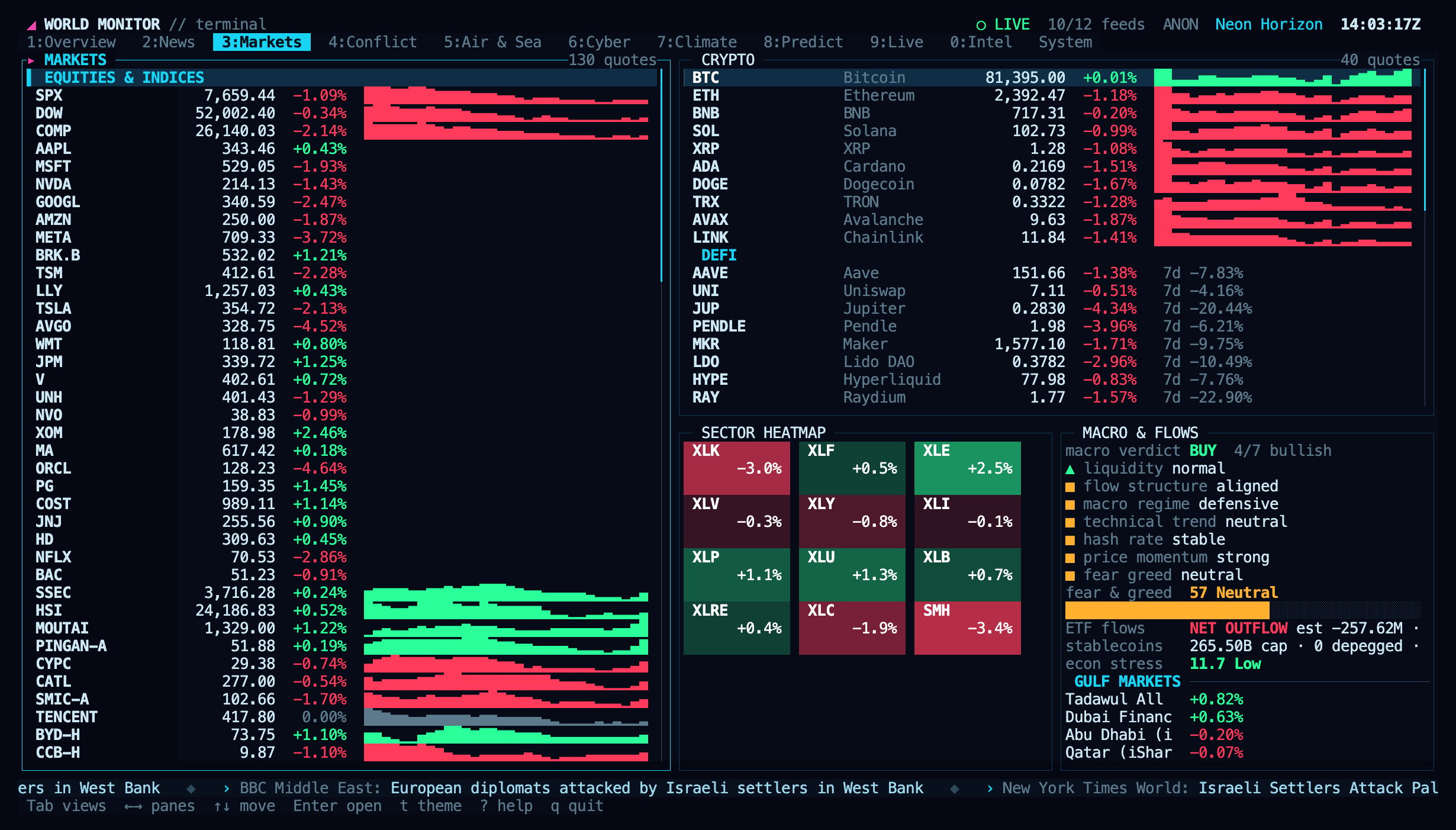
| `3` | Markets | Indices, commodities, FX and crypto with sparklines, sector heatmap, macro signals, fear & greed, ETF flows, stablecoins, Gulf markets |
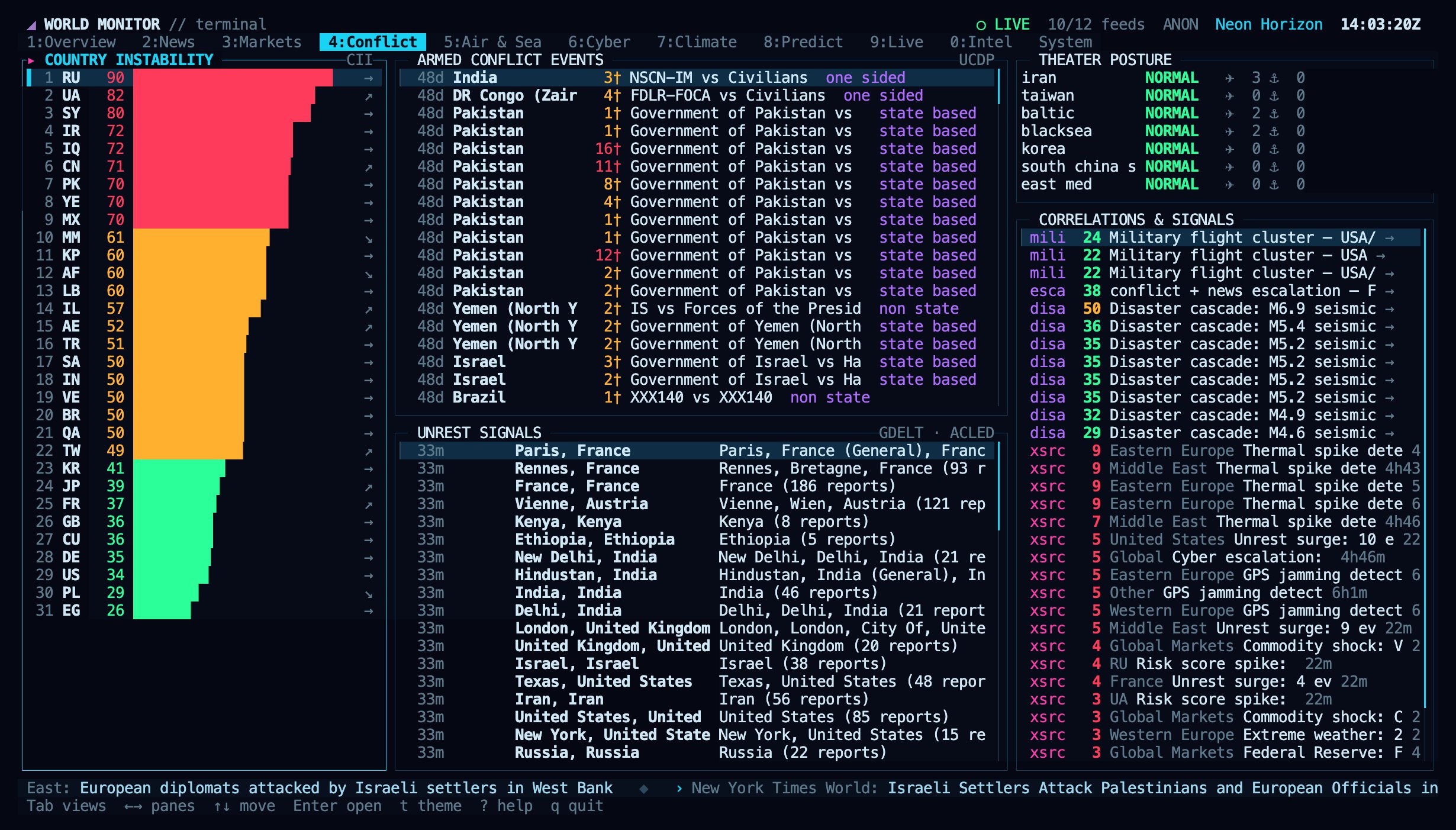
| `4` | Conflict | Country instability (CII) ranking, UCDP armed-conflict events, unrest, theater posture, correlation cards |
| `5` | Air & Sea | Military aircraft on the map, airport delays, chokepoints, vessel density, shipping stress, freight indices |
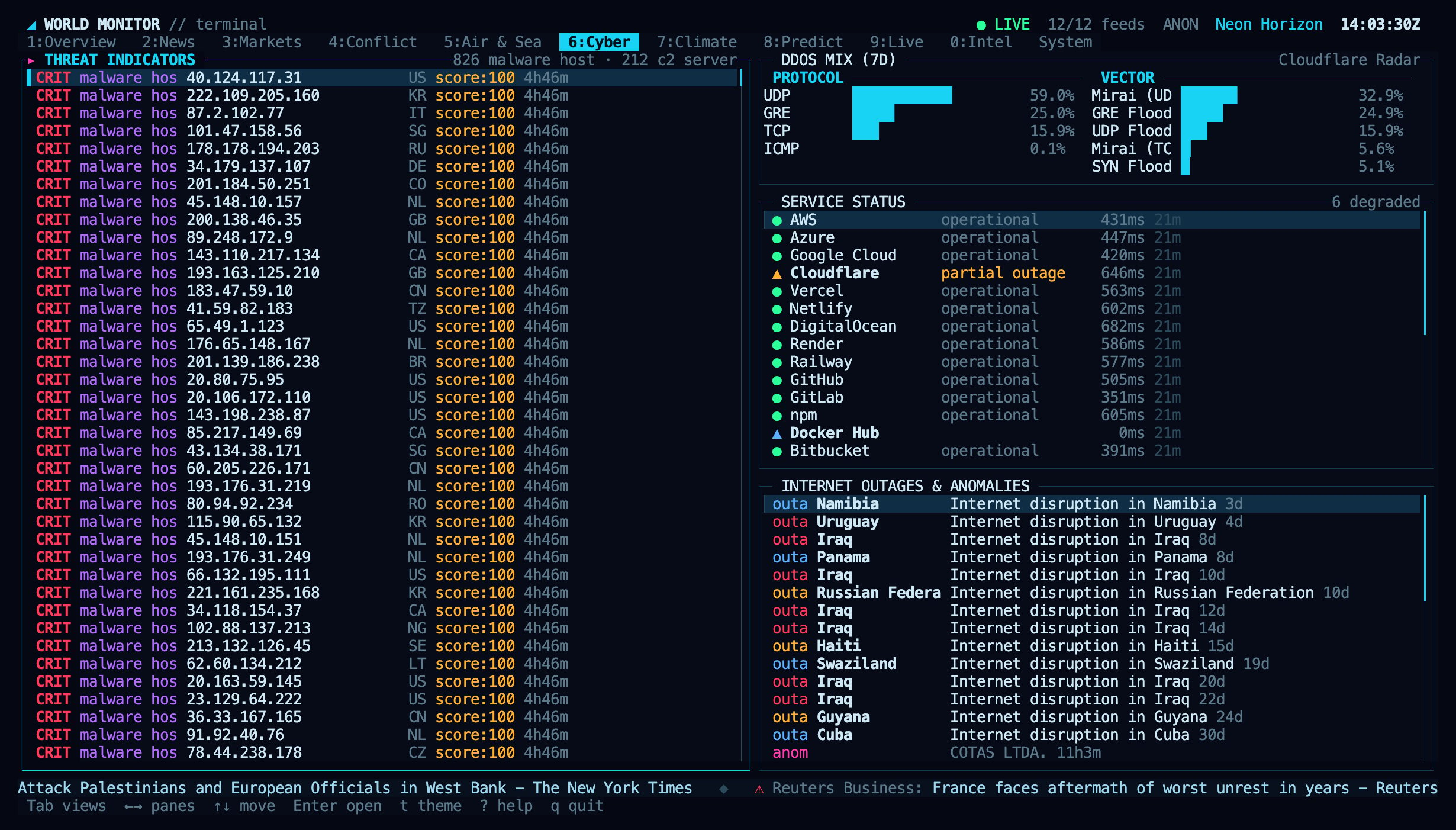
| `6` | Cyber | Threat indicators, DDoS protocol and vector mix, service status, internet outages, traffic anomalies |
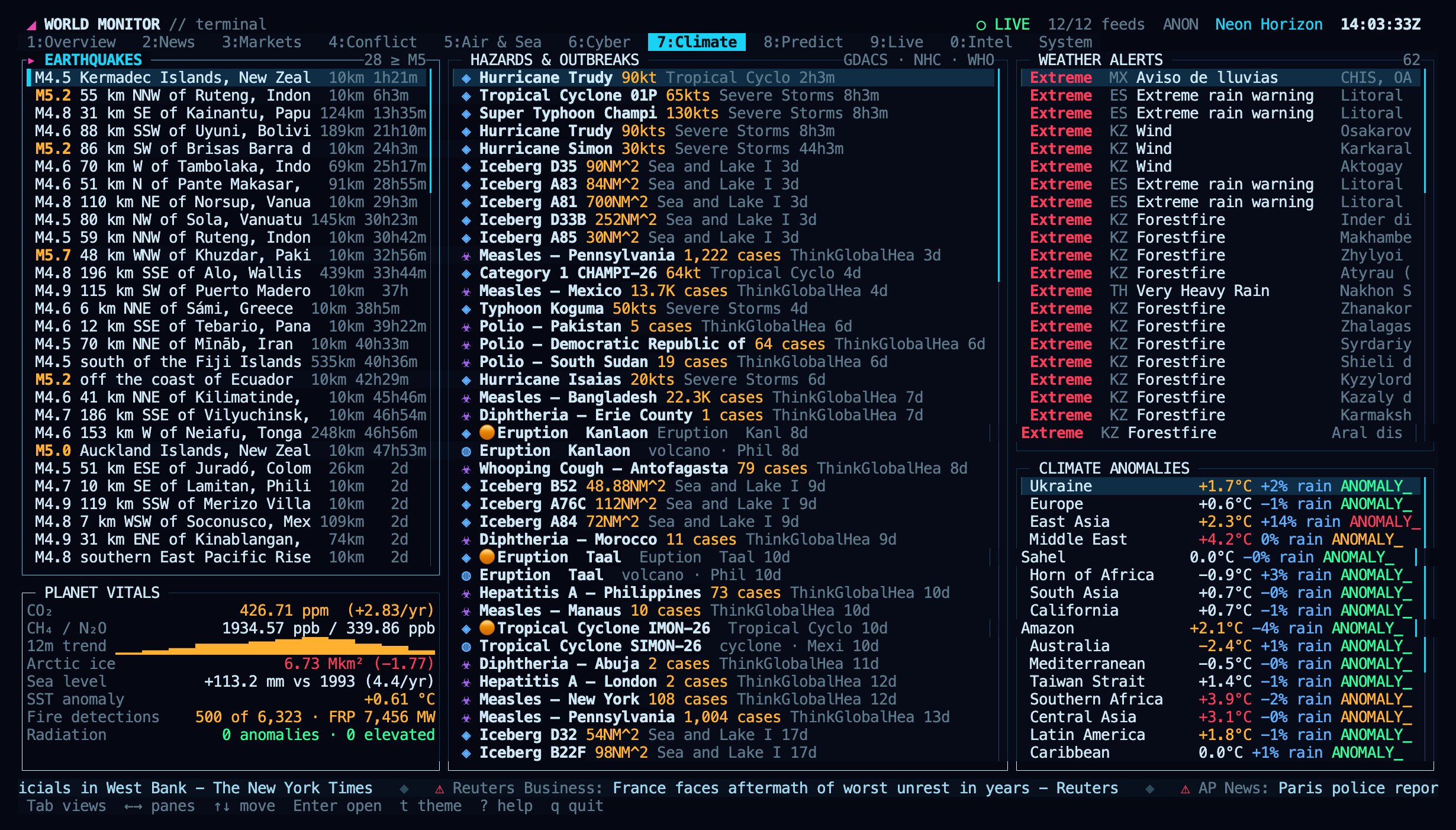
| `7` | Climate | Earthquakes, natural hazards, disease outbreaks, weather alerts, climate anomalies, planetary vitals |
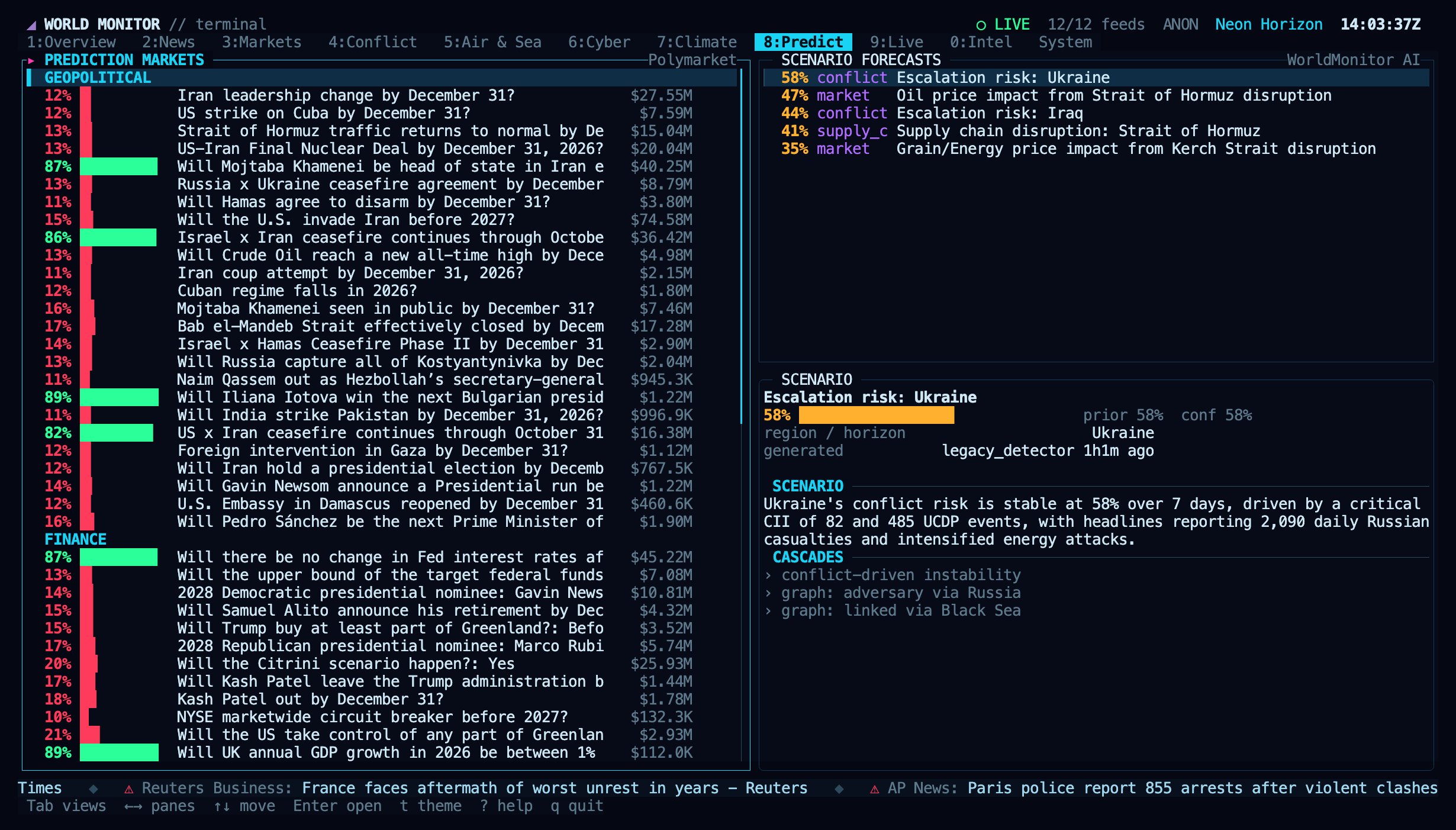
| `8` | Predict | Prediction markets by domain and AI scenario forecasts |
| `9` | Live | Live news channels and webcams, played in the terminal or the browser |
| `0` | Intel | GDELT topics, sanctions pressure, travel advisories, social velocity, US spending awards, tech events |
| `Tab` from Intel | System | Platform health, per-source freshness, theme and animation settings, video player status |
### News
### Requirements
* **Node.js 18 or newer.** The package has no dependencies.
* **An interactive terminal of at least 80×24.** Larger windows show more panes side by side; 160×45 or more gives the full layout shown on this page.
* **A terminal with truecolor and mouse support** for the best result, such as Ghostty, kitty, WezTerm, iTerm2, Konsole, Alacritty or the VS Code terminal. Terminals that do not report truecolor, including macOS Terminal, get 256 colours.
* **A font with braille and box-drawing characters** for the map and panel borders. Most current terminal fonts include them.
* **Optional:** [mpv](https://mpv.io) and [yt-dlp](https://github.com/yt-dlp/yt-dlp) to play live TV and webcams in the terminal. Without them, streams open in your browser.
## Views
Switch views with the number keys, `Tab` / `Shift+Tab`, or by clicking a tab.
| Key | View | What it shows |
| - | - | - |
| `1` | Overview | World map with live markers and a radar sweep, AI world brief, ranked top stories, market strip, theater posture |
| `2` | News | Digest sections with ranked, threat-classified headlines and a story detail pane |
| `3` | Markets | Indices, commodities, FX and crypto with sparklines, sector heatmap, macro signals, fear & greed, ETF flows, stablecoins, Gulf markets |
| `4` | Conflict | Country instability (CII) ranking, UCDP armed-conflict events, unrest, theater posture, correlation cards |
| `5` | Air & Sea | Military aircraft on the map, airport delays, chokepoints, vessel density, shipping stress, freight indices |
| `6` | Cyber | Threat indicators, DDoS protocol and vector mix, service status, internet outages, traffic anomalies |
| `7` | Climate | Earthquakes, natural hazards, disease outbreaks, weather alerts, climate anomalies, planetary vitals |
| `8` | Predict | Prediction markets by domain and AI scenario forecasts |
| `9` | Live | Live news channels and webcams, played in the terminal or the browser |
| `0` | Intel | GDELT topics, sanctions pressure, travel advisories, social velocity, US spending awards, tech events |
| `Tab` from Intel | System | Platform health, per-source freshness, theme and animation settings, video player status |
### News
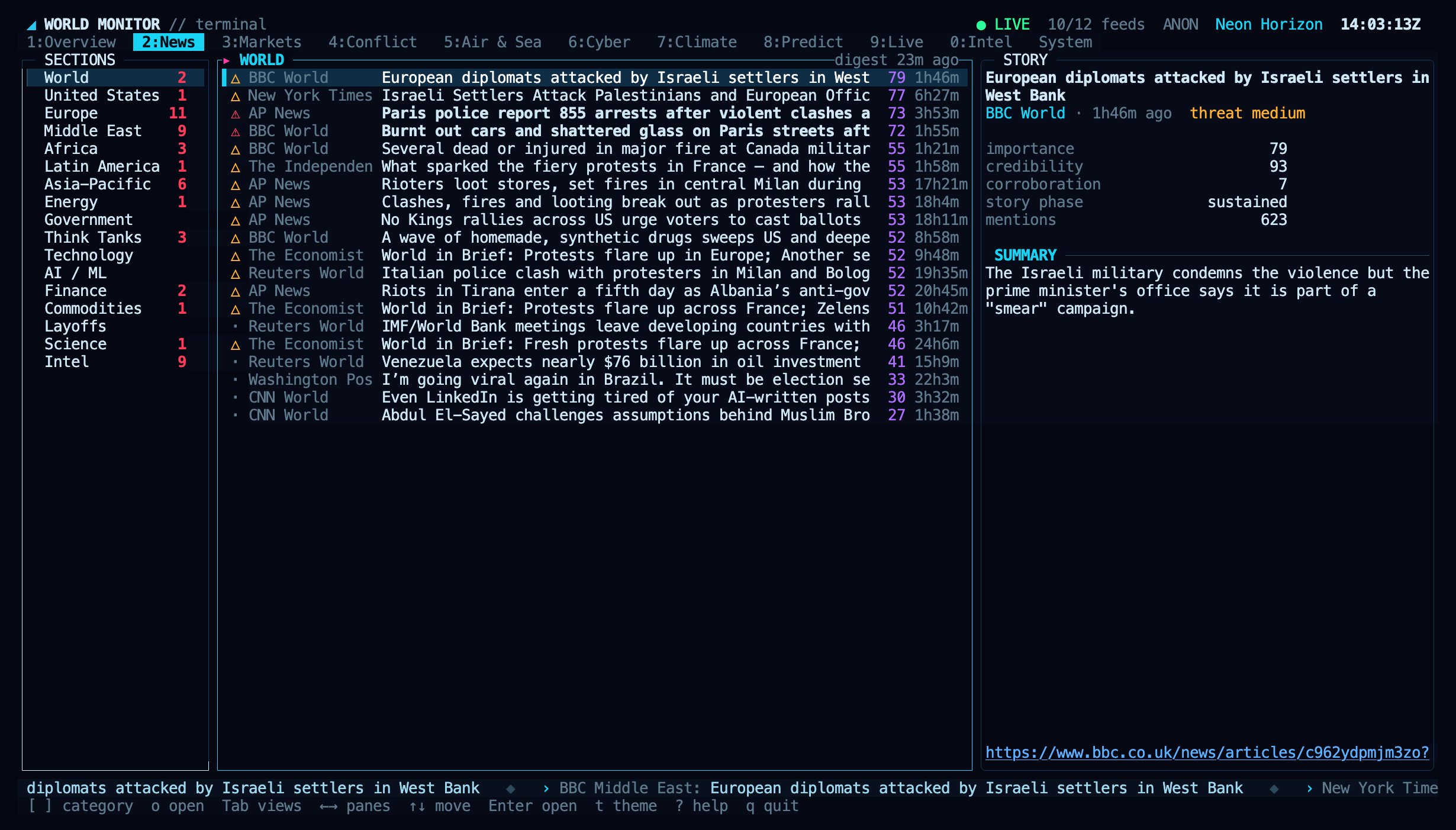 `[` and `]` change the section. `Enter` or `o` opens the selected story in your browser.
### Markets
`[` and `]` change the section. `Enter` or `o` opens the selected story in your browser.
### Markets
 ### Conflict
 ### Air & Sea
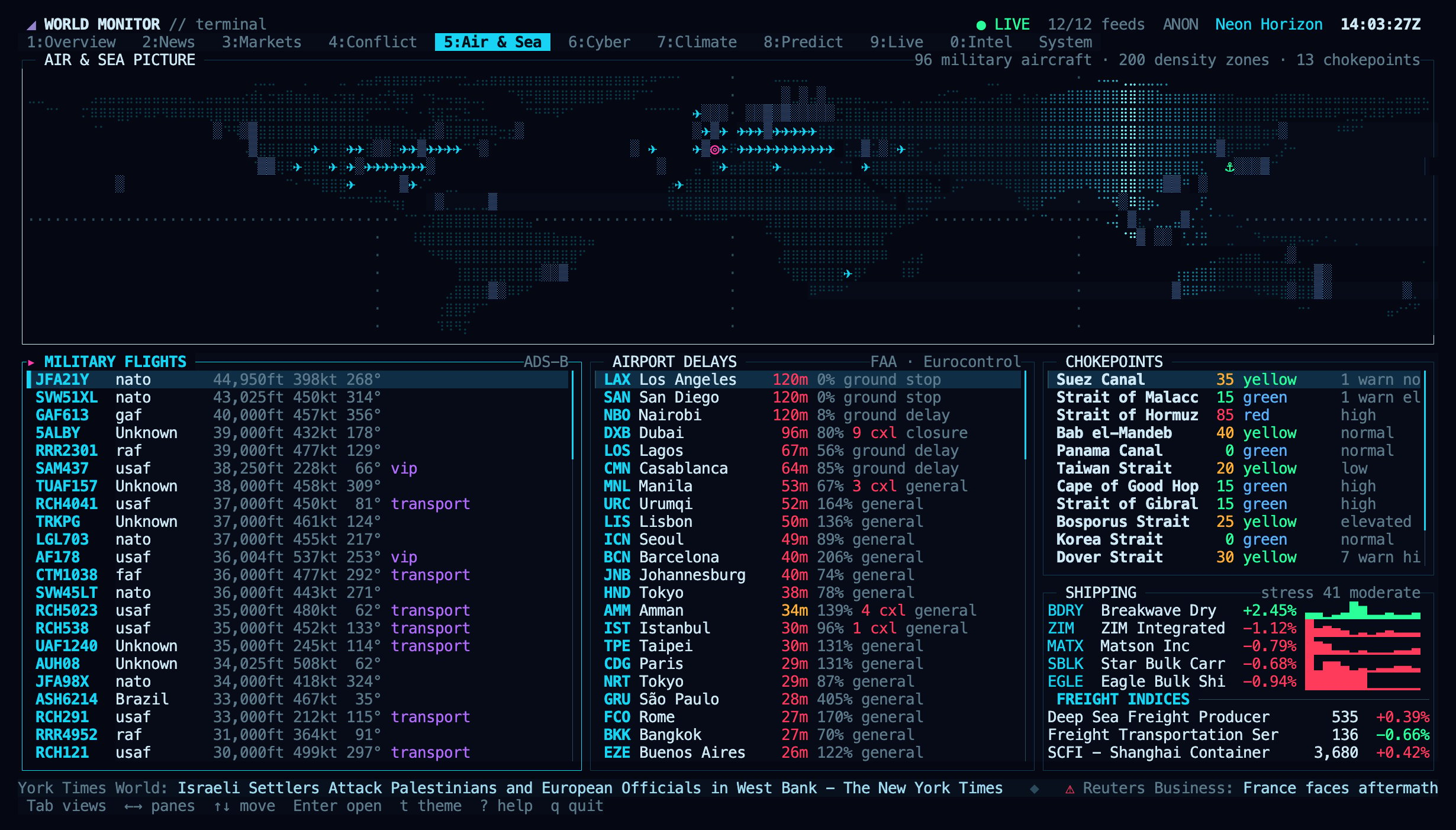 Military flights and vessel data load only while this view is open. The selected aircraft is highlighted on the map.
### Cyber
Military flights and vessel data load only while this view is open. The selected aircraft is highlighted on the map.
### Cyber
 ### Climate
 ### Predict
 ### Live
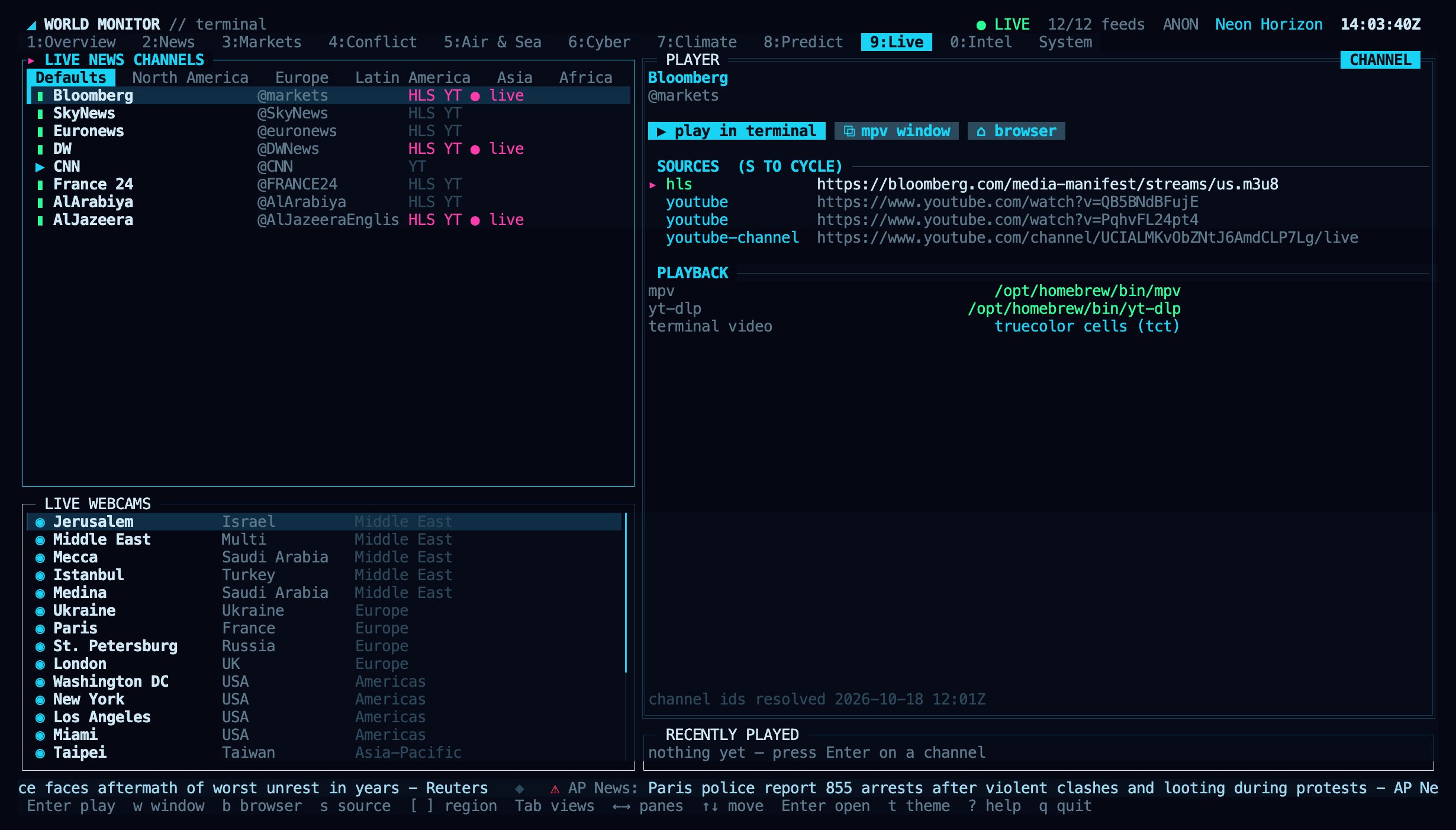 | Key | Action |
| - | - |
| `Enter` | Play the selected channel or webcam inside the terminal |
| `w` | Play in an mpv window |
| `b` | Open in the browser |
| `s` | Try the next stream source |
| `[` `]` | Change region |
Each channel tries the broadcaster's HLS stream first, then YouTube. In-terminal video uses the Kitty graphics protocol on Ghostty, kitty, WezTerm and Konsole for full-resolution pixels, and coloured character cells everywhere else, including inside tmux. Press `q` in mpv, or `Ctrl+C`, to stop playback and return to the dashboard.
Install the player on macOS with `brew install mpv yt-dlp`, or with your Linux package manager. Without mpv, `Enter` opens the stream in your browser.
### Intel
| Key | Action |
| - | - |
| `Enter` | Play the selected channel or webcam inside the terminal |
| `w` | Play in an mpv window |
| `b` | Open in the browser |
| `s` | Try the next stream source |
| `[` `]` | Change region |
Each channel tries the broadcaster's HLS stream first, then YouTube. In-terminal video uses the Kitty graphics protocol on Ghostty, kitty, WezTerm and Konsole for full-resolution pixels, and coloured character cells everywhere else, including inside tmux. Press `q` in mpv, or `Ctrl+C`, to stop playback and return to the dashboard.
Install the player on macOS with `brew install mpv yt-dlp`, or with your Linux package manager. Without mpv, `Enter` opens the stream in your browser.
### Intel
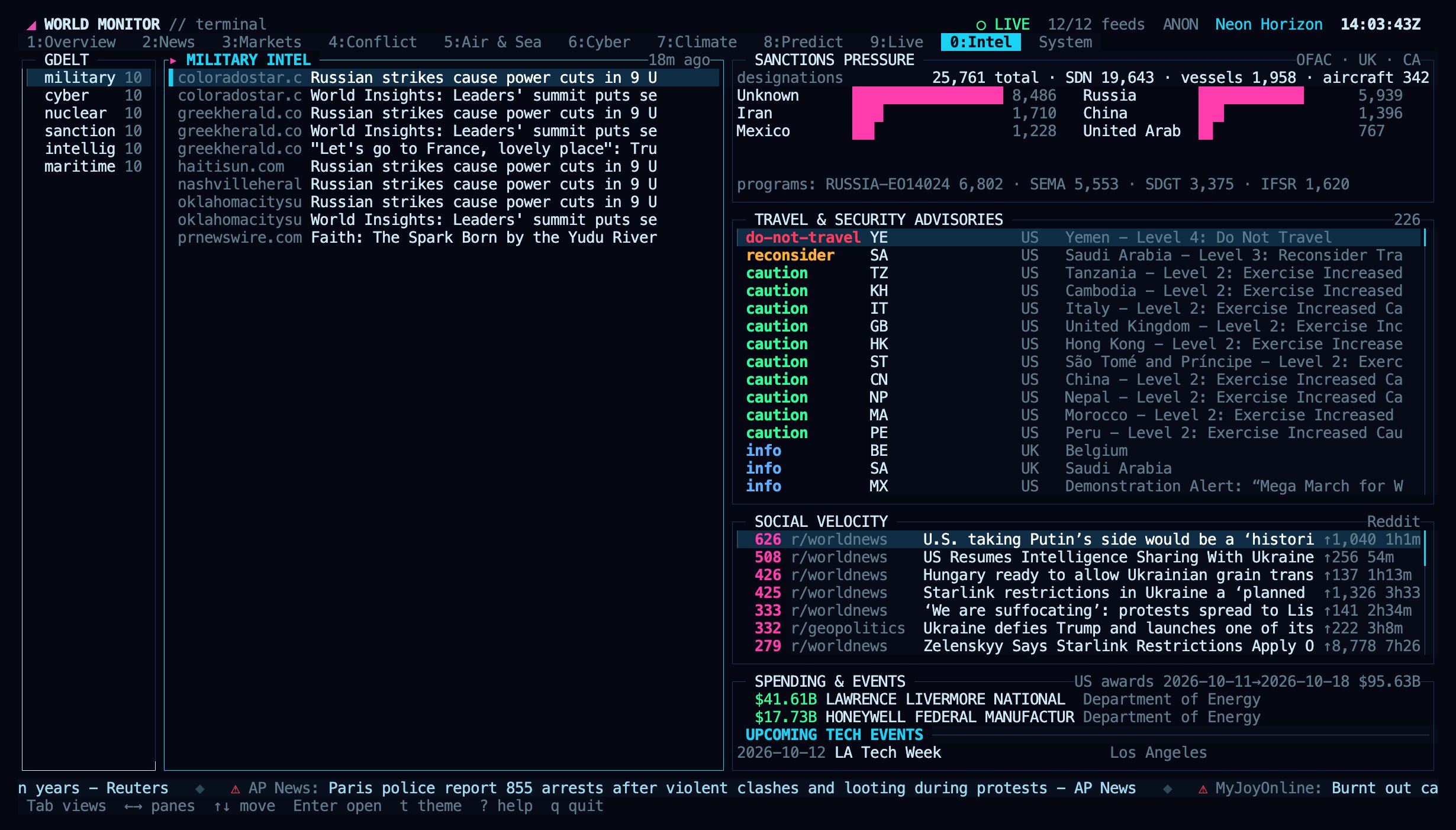 ### System
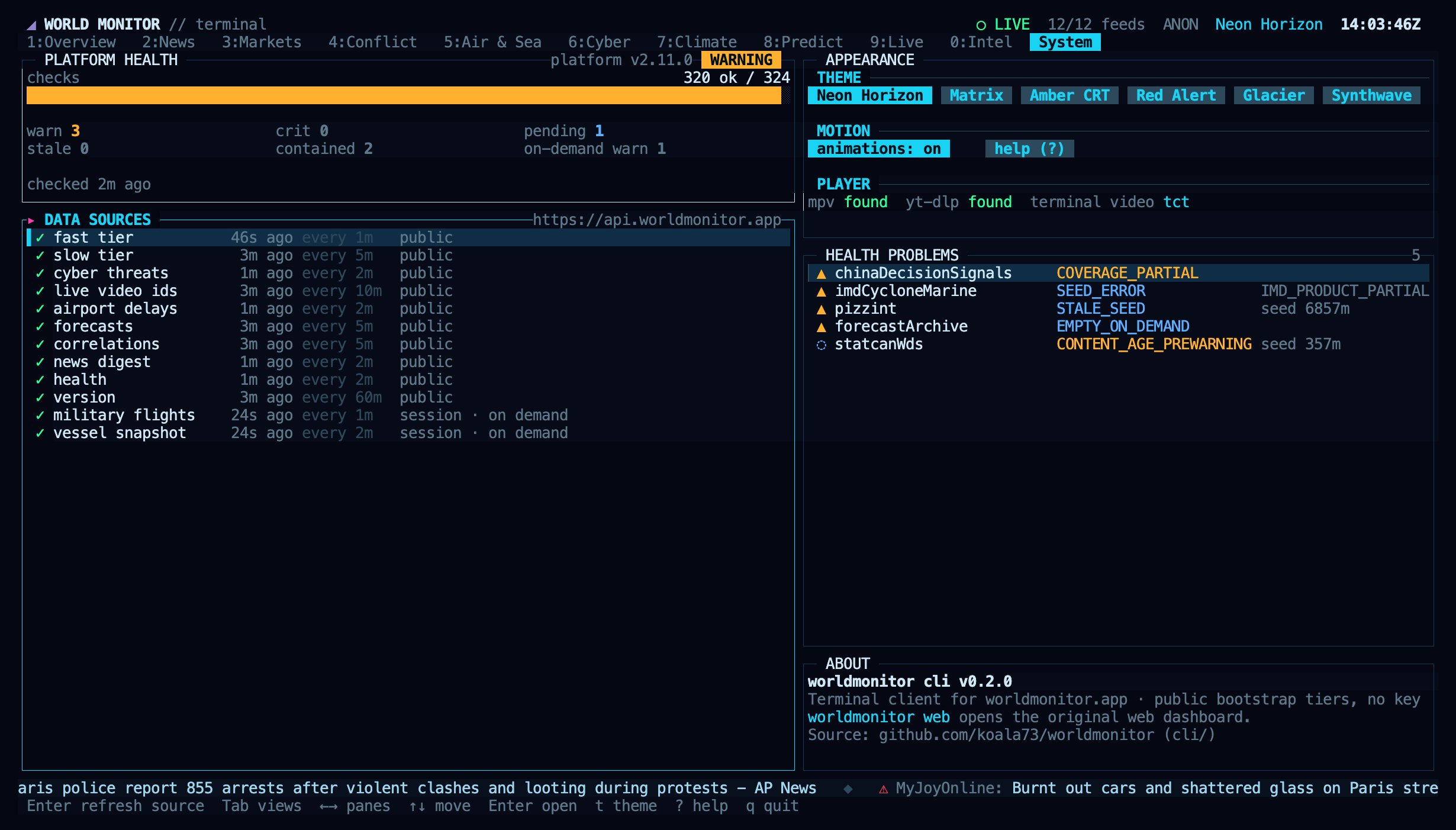 Use this view to check whether a source failed to load. `r` refreshes the current view immediately.
## Controls
Every action works from the keyboard, and tabs, rows and buttons are clickable. The mouse wheel scrolls lists. Press `?` at any time for the key reference.
Use this view to check whether a source failed to load. `r` refreshes the current view immediately.
## Controls
Every action works from the keyboard, and tabs, rows and buttons are clickable. The mouse wheel scrolls lists. Press `?` at any time for the key reference.
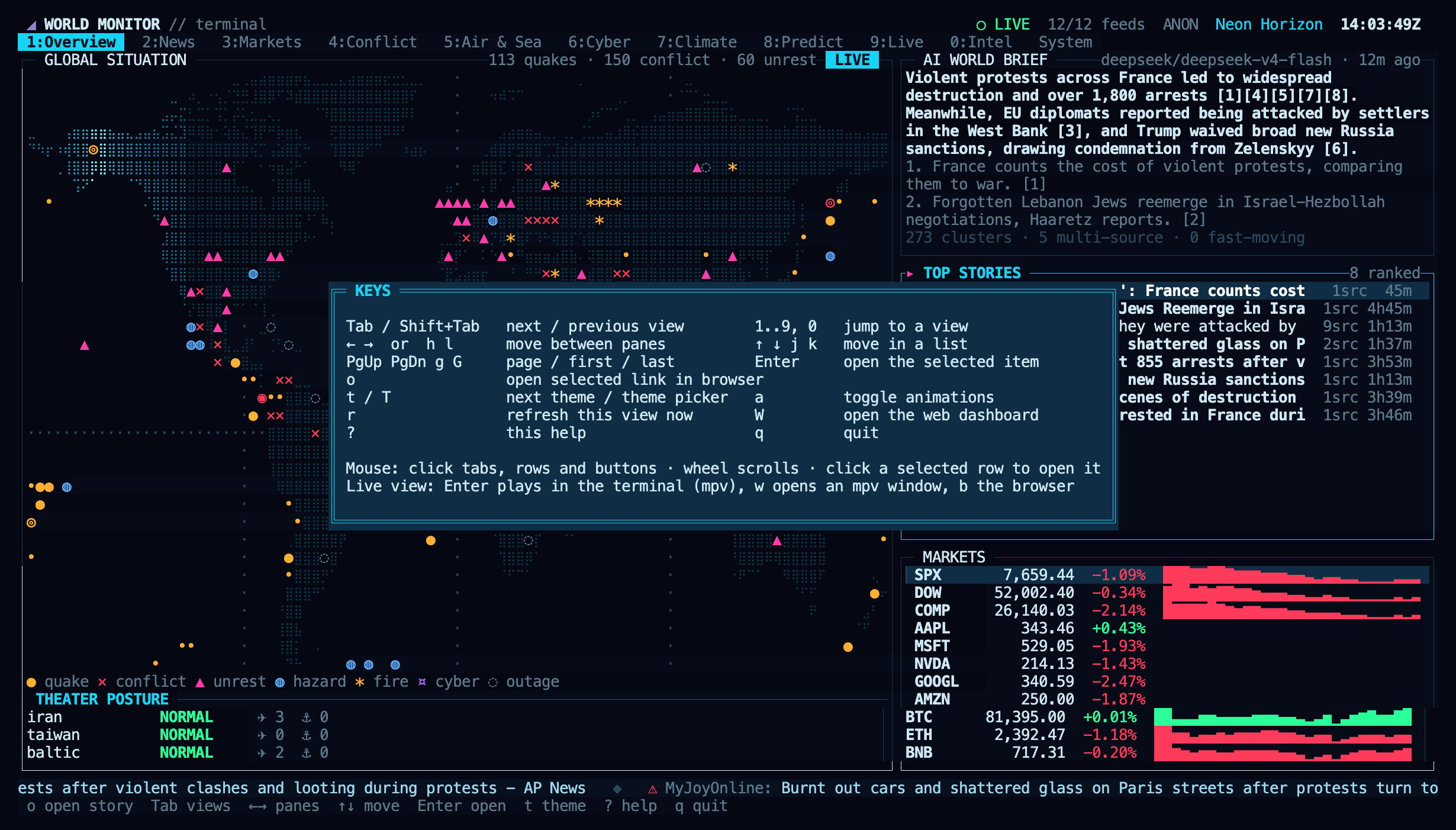 | Key | Action |
| - | - |
| `1`–`9`, `0` | Jump to a view |
| `Tab` / `Shift+Tab` | Next / previous view |
| `←` `→` or `h` `l` | Move between panes |
| `↑` `↓` or `j` `k` | Move in a list |
| `PgUp` `PgDn`, `g` `G` | Page, first, last |
| `Enter` | Open the selected item |
| `o` | Open the selected link in the browser |
| `t` / `T` | Next theme / theme picker |
| `a` | Toggle animations |
| `r` | Refresh the current view now |
| `W` | Open the web dashboard |
| `?` | Help |
| `q` or `Ctrl+C` | Quit |
## Themes
| Key | Action |
| - | - |
| `1`–`9`, `0` | Jump to a view |
| `Tab` / `Shift+Tab` | Next / previous view |
| `←` `→` or `h` `l` | Move between panes |
| `↑` `↓` or `j` `k` | Move in a list |
| `PgUp` `PgDn`, `g` `G` | Page, first, last |
| `Enter` | Open the selected item |
| `o` | Open the selected link in the browser |
| `t` / `T` | Next theme / theme picker |
| `a` | Toggle animations |
| `r` | Refresh the current view now |
| `W` | Open the web dashboard |
| `?` | Help |
| `q` or `Ctrl+C` | Quit |
## Themes
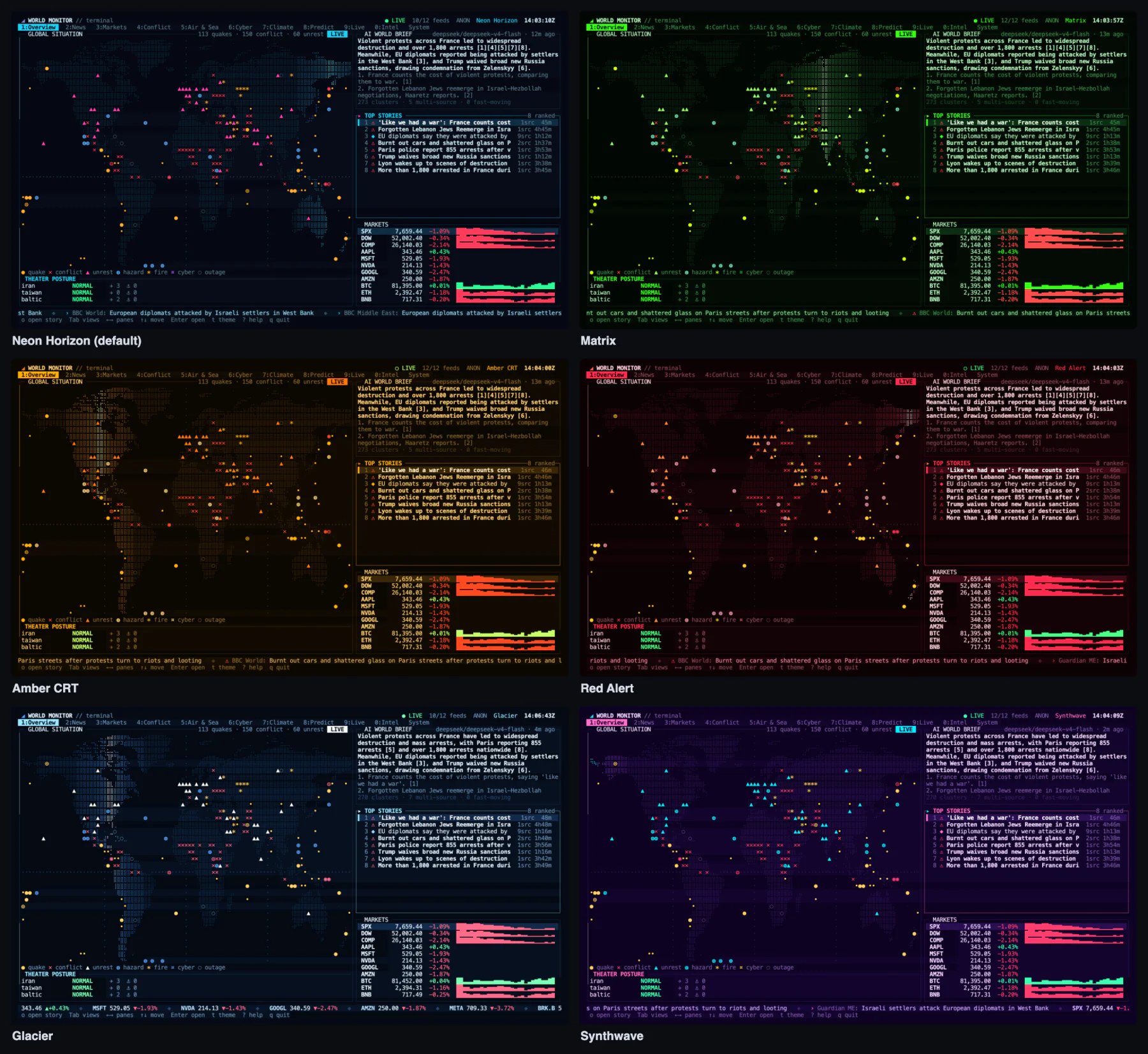 Press `t` to cycle themes, or `T` to open the picker. The picker previews each theme as you move through the list; `Enter` keeps it and `Esc` returns to the theme you had.
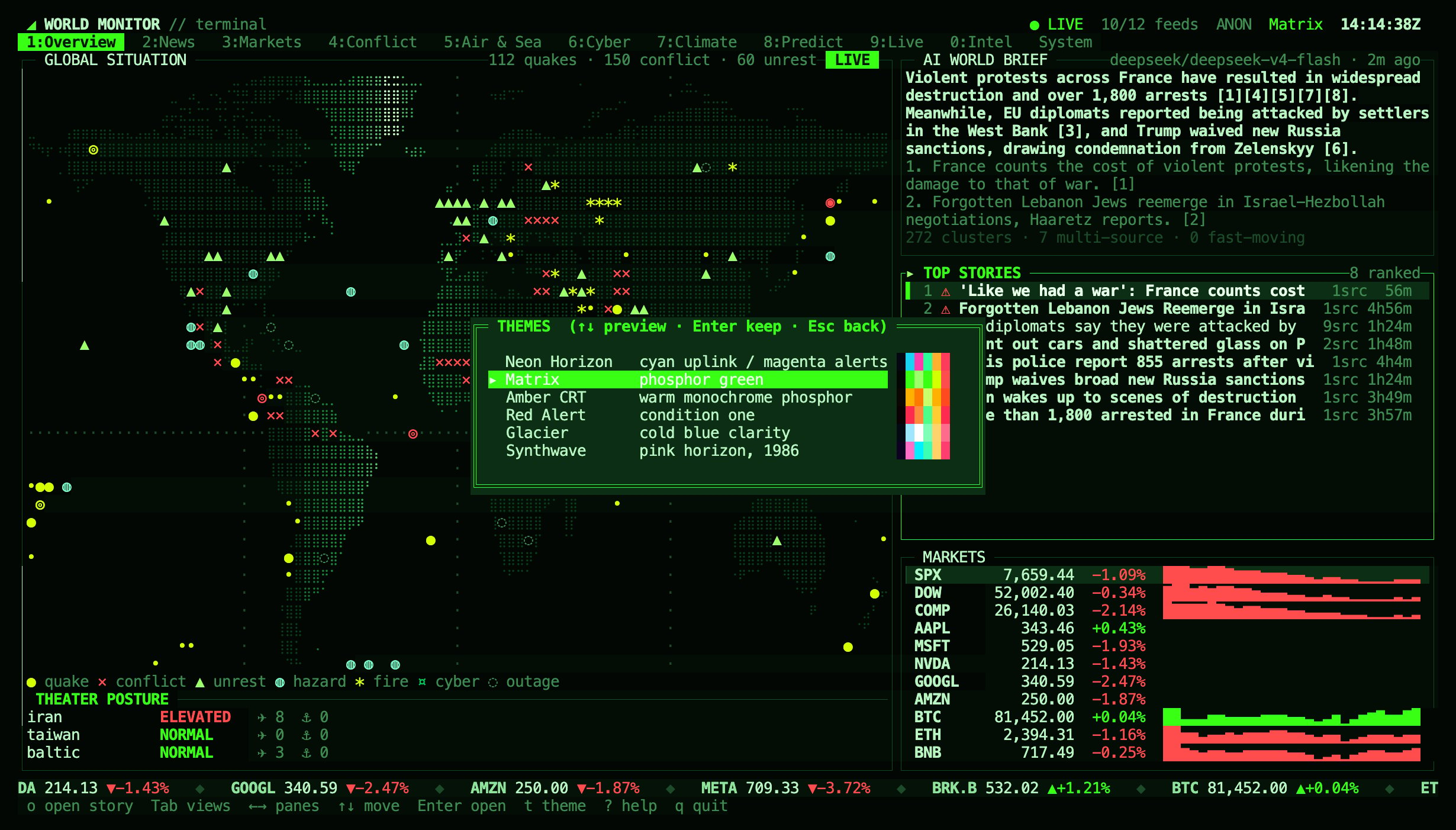 Your theme, the animation setting and the last view are saved in `$XDG_CONFIG_HOME/worldmonitor/tui.json` (usually `~/.config/worldmonitor/tui.json`). The file never contains your API key.
## Options
| Flag | Effect |
| - | - |
| `--theme ` | Start with a theme: `neon`, `matrix`, `amber`, `redalert`, `ice`, `synthwave` |
| `--no-anim` | Turn off animations (radar sweep, ticker, typewriter brief). `a` toggles them while running |
| `--fps ` | Frame rate while animating, 5–60 (default 20) |
| `--base-url ` | API host for a self-hosted deployment |
| `--api-key ` | Use your API key instead of an anonymous session |
These flags apply to the terminal dashboard. `worldmonitor web` has its own flags, listed under [Open the web dashboard](#open-the-web-dashboard). On every other command, `--theme`, `--url` and similar flags are passed through to the API as parameters.
| Environment variable | Effect |
| - | - |
| `WORLDMONITOR_API_KEY` | API key used instead of the anonymous session |
| `WORLDMONITOR_BASE_URL` | API host, shared with the other CLI commands |
| `WORLDMONITOR_TUI_BASE_URL` | API host for the dashboard only |
| `WM_TUI_COLOR` | Force `truecolor` or `256` colours when detection is wrong |
| `WM_TUI_VO` | Force mpv's terminal video output, for example `kitty` or `tct` |
| `WM_TUI_FORCE` | Start the dashboard even when stdin or stdout is not a terminal |
## Data and privacy
The dashboard reads the same public endpoints as the web dashboard: the public bootstrap tiers, the news digest, the compact health endpoint and the version endpoint. Military flights and vessel snapshots use an anonymous, short-lived session token, minted the same way the browser mints one. When `WORLDMONITOR_API_KEY` or `--api-key` is set, that key is sent instead.
Data refreshes in the background: the fast tier every minute, news and health every 2 minutes, the slow tier every 5 minutes. Flights and vessels refresh only while the Air & Sea view is open. A source that fails waits before it retries, and the System view shows its error.
## Open the web dashboard
```sh theme={null}
worldmonitor web
```
Opens [worldmonitor.app/dashboard](https://www.worldmonitor.app/dashboard) in your browser. Inside a clone of the World Monitor repository it starts the local development server (`npm run dev`) instead and opens the local URL.
| Flag | Effect |
| - | - |
| `--hosted` | Always open the hosted dashboard, even inside a checkout |
| `--port ` | Port for the local development server (default 5173) |
| `--no-open` | Print the URL without opening a browser |
| `--url ` | Open this URL instead of the hosted dashboard. Inside a checkout, add `--hosted`, or the local development server starts instead |
## Troubleshooting
* **The map or borders show boxes or question marks.** Your font lacks braille or box-drawing characters. Switch to a current terminal font such as JetBrains Mono, Fira Code, SF Mono, Menlo or Cascadia Code.
* **Colours look washed out or wrong.** Your terminal may not report truecolor support. Set `COLORTERM=truecolor`, or `WM_TUI_COLOR=256` if your terminal only supports 256 colours.
* **The mouse does not work inside tmux.** Enable it with `set -g mouse on` in your tmux configuration.
* **"The dashboard needs an interactive terminal".** stdin or stdout is a pipe or file. Run `worldmonitor tui` directly in a terminal, or use the [scripting commands](/docs/cli) for automation.
* **Video does not play.** Check the Player section of the System view. mpv and yt-dlp must be on your `PATH`; otherwise streams open in the browser.
* **A view is empty.** Open the System view to see which source failed and when it will retry. `r` refreshes the current view.
## Related
* **[Command-Line Client](/docs/cli)**: script briefs, risk scores and MCP tools from the same `worldmonitor` command.
* **[Desktop App](/docs/desktop-app)**: the full web dashboard as a native app.
* **[SDKs](/docs/sdks)**: Python, Ruby and Go clients.
* **[MCP server](/docs/mcp-overview)**: connect an AI agent.
This documentation is built and hosted on [Mintlify](https://mintlify.com), a developer documentation platform.
Your theme, the animation setting and the last view are saved in `$XDG_CONFIG_HOME/worldmonitor/tui.json` (usually `~/.config/worldmonitor/tui.json`). The file never contains your API key.
## Options
| Flag | Effect |
| - | - |
| `--theme ` | Start with a theme: `neon`, `matrix`, `amber`, `redalert`, `ice`, `synthwave` |
| `--no-anim` | Turn off animations (radar sweep, ticker, typewriter brief). `a` toggles them while running |
| `--fps ` | Frame rate while animating, 5–60 (default 20) |
| `--base-url ` | API host for a self-hosted deployment |
| `--api-key ` | Use your API key instead of an anonymous session |
These flags apply to the terminal dashboard. `worldmonitor web` has its own flags, listed under [Open the web dashboard](#open-the-web-dashboard). On every other command, `--theme`, `--url` and similar flags are passed through to the API as parameters.
| Environment variable | Effect |
| - | - |
| `WORLDMONITOR_API_KEY` | API key used instead of the anonymous session |
| `WORLDMONITOR_BASE_URL` | API host, shared with the other CLI commands |
| `WORLDMONITOR_TUI_BASE_URL` | API host for the dashboard only |
| `WM_TUI_COLOR` | Force `truecolor` or `256` colours when detection is wrong |
| `WM_TUI_VO` | Force mpv's terminal video output, for example `kitty` or `tct` |
| `WM_TUI_FORCE` | Start the dashboard even when stdin or stdout is not a terminal |
## Data and privacy
The dashboard reads the same public endpoints as the web dashboard: the public bootstrap tiers, the news digest, the compact health endpoint and the version endpoint. Military flights and vessel snapshots use an anonymous, short-lived session token, minted the same way the browser mints one. When `WORLDMONITOR_API_KEY` or `--api-key` is set, that key is sent instead.
Data refreshes in the background: the fast tier every minute, news and health every 2 minutes, the slow tier every 5 minutes. Flights and vessels refresh only while the Air & Sea view is open. A source that fails waits before it retries, and the System view shows its error.
## Open the web dashboard
```sh theme={null}
worldmonitor web
```
Opens [worldmonitor.app/dashboard](https://www.worldmonitor.app/dashboard) in your browser. Inside a clone of the World Monitor repository it starts the local development server (`npm run dev`) instead and opens the local URL.
| Flag | Effect |
| - | - |
| `--hosted` | Always open the hosted dashboard, even inside a checkout |
| `--port ` | Port for the local development server (default 5173) |
| `--no-open` | Print the URL without opening a browser |
| `--url ` | Open this URL instead of the hosted dashboard. Inside a checkout, add `--hosted`, or the local development server starts instead |
## Troubleshooting
* **The map or borders show boxes or question marks.** Your font lacks braille or box-drawing characters. Switch to a current terminal font such as JetBrains Mono, Fira Code, SF Mono, Menlo or Cascadia Code.
* **Colours look washed out or wrong.** Your terminal may not report truecolor support. Set `COLORTERM=truecolor`, or `WM_TUI_COLOR=256` if your terminal only supports 256 colours.
* **The mouse does not work inside tmux.** Enable it with `set -g mouse on` in your tmux configuration.
* **"The dashboard needs an interactive terminal".** stdin or stdout is a pipe or file. Run `worldmonitor tui` directly in a terminal, or use the [scripting commands](/docs/cli) for automation.
* **Video does not play.** Check the Player section of the System view. mpv and yt-dlp must be on your `PATH`; otherwise streams open in the browser.
* **A view is empty.** Open the System view to see which source failed and when it will retry. `r` refreshes the current view.
## Related
* **[Command-Line Client](/docs/cli)**: script briefs, risk scores and MCP tools from the same `worldmonitor` command.
* **[Desktop App](/docs/desktop-app)**: the full web dashboard as a native app.
* **[SDKs](/docs/sdks)**: Python, Ruby and Go clients.
* **[MCP server](/docs/mcp-overview)**: connect an AI agent.
This documentation is built and hosted on [Mintlify](https://mintlify.com), a developer documentation platform.